Restart iPhone
If your iPhone isn’t working right, try restarting it.
Turn iPhone off then on
-
To turn iPhone off, do one of following:
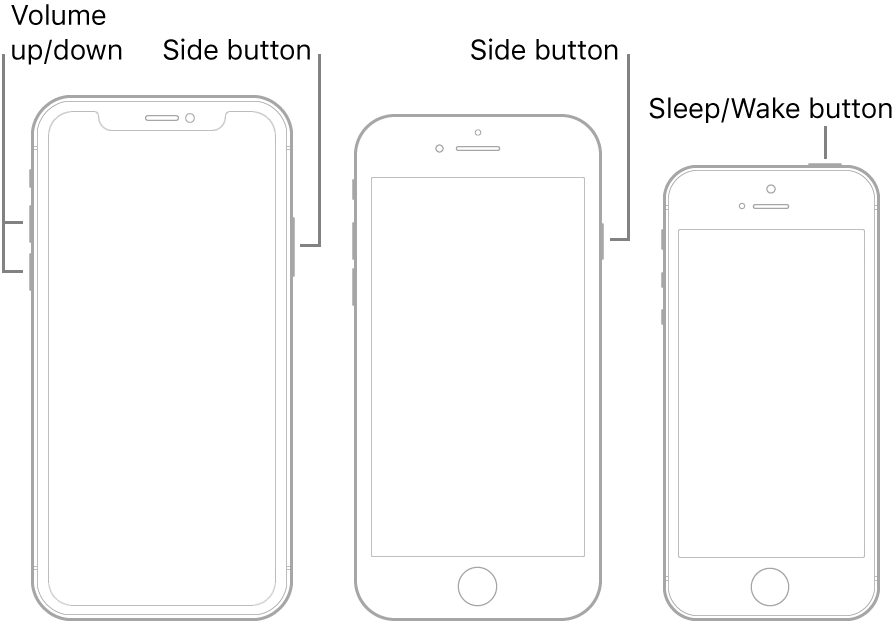
- On an iPhone without a Home button: Simultaneously press and hold the side button and either volume button until the sliders appear, then drag the Power Off slider.
- On an iPhone with a Home button: Press and hold the side button or Sleep/Wake button (depending on your model), then drag the slider.
- Note the Power/Side or Sleep/Wake button can be configured in Emergency SOS settings to do different things
- All models: Go to Settings
 > General > Shut Down, then drag the slider.
- To turn iPhone back on, press and hold the side button or Sleep/Wake button (depending on your model) until the Apple logo appears.
If you can’t turn iPhone off and on, try forcing it to restart.